
Unit Price Comparison Calculator
Compare package offers on the same measurement basis, then see what you would actually pay when buying whole offer bundles. Results update as you type, without a Calculate button.
Try a shopping example
Choose a fair comparison
Select a shared unit and comparison quantity. Every offer must use a unit from the same measurement family. Weight and volume are not interchangeable without product-specific density. Compare similar products and quality.
Currency changes formatting only. All prices must already use the same currency; there is no exchange-rate conversion.
Build your product offers
The price is for one paid package. Quantity × items per package gives its contents. An offer bundle contains the entered paid and free packages. Buy-two-get-one-free is two paid packages and one free package; only complete bundles are bought.
Apply the percentage discount to paid merchandise first, then the fixed coupon once per order, capped at that merchandise amount. Add tax only when the entered product price excludes it. Shipping is an all-in amount charged once per order. Coupon and shipping are not repeated for every purchased bundle. This model does not check coupon eligibility or tax rules.
Use 100% when all contents are usable. A lower percentage represents your estimated usable share after waste or spoilage. It changes usable quantity, not the amount bought or paid. Item-count quantities must be whole; servings may be fractional.
Your normalized price comparison
Several offers share the lowest price.
This unit-price comparison includes the coupon and shipping for one offer bundle. It is a normalized comparison, not the cost of buying a fraction of a package. Whole-order costs below can rank offers differently. A negative saving means the offer costs more than the reference.
Compare every offer
Compare prices on the same basis
Shorter bars mean a lower cost for the selected comparison quantity. All bars use the same currency, unit and usable-content assumption.
Usable contents of one offer bundle
Offer cost and contents
See every calculation
How much do you need to buy?
Enter a required usable quantity in the shared unit. The calculator buys the minimum whole number of offer bundles covering that amount. The fixed coupon and all-in shipping apply once to the entire order. With zero demand, no order is placed and the cost is zero.
Enter a required usable quantity to compare whole orders.
Your whole-order shopping plan
Unused usable contents are leftovers, not automatically waste. This compares buying only one offer type per order; it does not optimize a mixed shopping basket. Offer availability, quality, eligibility, expiry dates and actual invoice rounding must be checked separately.
Whole packages, costs and leftovers
Compare actual whole-order costs
See every calculation
Notation
| q | Quantity inside each item |
|---|---|
| k | Items inside each package |
| b | Paid packages per offer bundle |
| f | Free packages per offer bundle |
| u | Usable proportion (%) |
| P | Price per paid package |
| d | Percentage discount (%) |
| C | Fixed coupon per order |
| H | All-in shipping per order |
| t | Tax rate to add (%) |
| c | Conversion factor — Quantity unit |
| cᵣ | Conversion factor — Shared comparison unit |
| a | Quantity for the displayed unit price |
| Q | Purchased quantity |
| Qᵤ | Usable quantity |
| N | Offer bundles to buy |
| D | Required usable quantity — optional |
| R | Usable amount left over |
All contents in the formulas use grams for weight or milliliters for liquid volume; item counts and servings use their own separate bases. Q is the total content of one complete offer bundle, not one item. The tax rate is zero when product prices already include tax. Money is calculated without intermediate rounding. Displayed prices may round differently from invoices.
Compare package prices per equal quantity
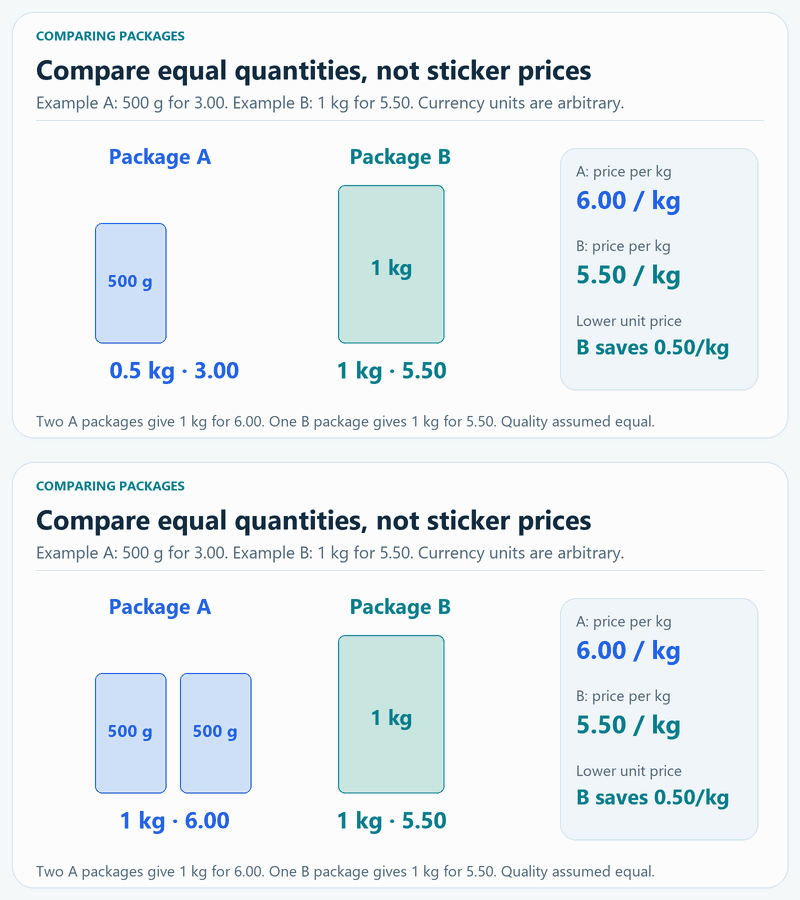
Choose the useful deal, not just the biggest pack
Compare the same kind of product, contents and quality. A large pack may have a lower normalized unit price but require a higher checkout payment. Consider usable contents, storage, expiry dates and whether a promotion applies to your order. The calculator compares entered offers; it does not fetch shop prices or recommend a brand.
Unit-price comparison questions
Can I compare grams with kilograms or ounces?
Yes. Weight units are converted to the same base before comparison. Liquid-volume units can also be compared with one another. US and Imperial fluid measures are identified separately. Weight is not converted to volume without density.
How do I enter a multipack?
Enter the price of the package, the content of each item and the number of items in the package. For several paid or free packages in a promotion, enter those package counts separately. Do not multiply the price or content twice.
How are coupons, tax and shipping handled?
The percentage discount reduces paid merchandise, then a fixed coupon reduces the merchandise amount once per order, without creating a negative price. The entered tax rate applies only when product prices exclude tax. All-in shipping is added once per order and is not reduced by the merchandise coupon.
Why can the best unit price differ from the cheapest whole order?
You may need several smaller packages or an entire promotional bundle. The fixed coupon and shipping apply once to the order, while leftover contents also vary. The whole-order planner calculates the actual entered package combinations for each offer separately.
Does the usable percentage change the purchased quantity?
No. It changes only the estimated useful contents. The purchase quantity and package price stay the same. The planner buys enough bundles to cover the requested usable amount; leftover usable contents are shown separately.
Does the calculator save or send my product names and prices?
No. This calculator runs in your browser and does not submit entered product names or prices to a server. You can copy, print or download your comparison yourself.
Measurement and comparison references
Calculations run in your browser. This calculator does not send entered product names or prices to a server.